由于某些原因[1]不能直接使用 egit 的 update site. 以下为直接安装 egit 的方法
1. 下载 egit 源码
$ git clone git://repo.or.cz/egit.git
2. 打开 eclipse, 选择 File -> Import -> General -> Existing Projects into Workspace, 选择刚才的 git 目录, 导入全部的项目(大约是9个)
3. 等待 Eclipse 的 Building Workspace 结束
4. 找到 org.spearce.egit-updatesite 项目,用 "Site Manifest Editor" 打开 site.xml (缺省就是这个)
5. 在打开的界面点击 "Build All"。 注意如果以前安装过 egit, 这一步会出错,需要全部删除后重新开始。
6. 在 Help->Software Updates 中选择 Add Site, 然后点击 Local, 选择 org.spearce.egit-updatesite 的工程目录即可。
[1] http://code.google.com/p/egit/issues/detail?id=53
Showing posts with label eclipse. Show all posts
Showing posts with label eclipse. Show all posts
2009-01-17


mylyn 连接 google code 出错的解决办法
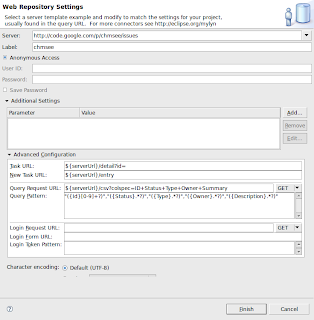
通过 mylyn 的 Generic Web Connector(从[1]安装) 可以连接 Google Code, 不过最近没法正常连接, 解决方案如下(参考[2]):
修改 repository 的属性, 修改其中的 Additional Settings -> Advanced Configuration 中的 "Query Request URL" 和 "Query Pattern" 两项, 分别修改为
[1] http://download.eclipse.org/tools/mylyn/update/incubator
[2] https://bugs.eclipse.org/bugs/show_bug.cgi?id=260137
修改 repository 的属性, 修改其中的 Additional Settings -> Advanced Configuration 中的 "Query Request URL" 和 "Query Pattern" 两项, 分别修改为
- Query Request URL: ${serverUrl}/csv?colspec=ID+Status+Type+Owner+Summary
- Query Pattern: "({Id}[0-9]+?)","({Status}.*?)","({Type}.*?)","({Owner}.*?)","({Description}.*?)"

[1] http://download.eclipse.org/tools/mylyn/update/incubator
[2] https://bugs.eclipse.org/bugs/show_bug.cgi?id=260137
Subscribe to:
Posts (Atom)